
Download FitLens AI – AI‑Powered Gym Companion for Safer, Smarter Workouts
Overview of FitLens AI
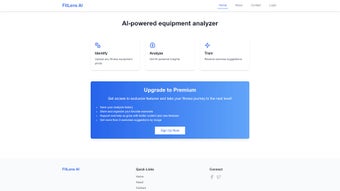
FitLens AI is a web‑based application that acts as a personal gym companion, leveraging cutting‑edge artificial intelligence to make every workout session safer and more effective. Whether you’re a beginner learning the ropes or an experienced athlete fine‑tuning your routine, FitLens AI bridges the gap between knowledge and execution. The core capability of the platform lies in its image‑recognition engine: users simply snap a photo of a gym machine, upload it to the platform, and receive instant, AI‑generated guidance on proper usage, safety precautions, and optimal form. This reduces the likelihood of common gym injuries and accelerates progress toward fitness goals.
Beyond the basic identification service, FitLens AI offers a suite of personalized recommendations. The system analyses your uploaded images, evaluates your current form, and suggests adjustments in real time. It also creates a dynamic workout plan that adapts to the equipment you have access to, ensuring that you never waste time wondering which machine to use next. For users who crave deeper insights, the premium tier unlocks advanced features such as saving analysis history, curating a library of favorite exercises, and receiving multiple exercise suggestions per image—transforming the app from a simple helper into a comprehensive training hub.
In an era where fitness apps proliferate, FitLens AI differentiates itself by focusing on visual recognition and contextual advice rather than generic step counters. Its web‑first approach means you can access the service from any modern browser, eliminating the need for bulky installations while still delivering a secure, fast, and regularly updated experience. Whether you train at a commercial gym, a boutique studio, or a home setup, FitLens AI equips you with the confidence to use equipment correctly, stay injury‑free, and push past plateaus.
Core Features & Premium Add‑Ons
Essential Features (Free Tier)
- AI‑driven image recognition that identifies over 200 common gym machines.
- Step‑by‑step usage instructions displayed instantly after upload.
- Safety alerts highlighting potential misuse and injury‑prevention tips.
- Basic form analysis with visual cues to correct posture.
- Personalized workout suggestions based on detected equipment.
- Secure cloud processing—no personal photos are stored permanently.
Premium Upgrade – What You Unlock
- Analysis History: Automatically save each image review, allowing you to track progress over weeks or months.
- Favorites Library: Tag and organize your preferred exercises for quick reference during future sessions.
- Multi‑Exercise Recommendations: Receive up to three complementary exercise ideas per uploaded image, expanding your routine without extra research.
- Advanced Form Feedback: Detailed joint‑angle metrics and video overlays for precision training.
- Priority Support & Early Access: Get help from the development team faster and test upcoming AI models before public release.
The premium plan is priced competitively at $9.99 per month or $99 annually, offering a cost‑effective way to turn a simple AI assistant into a full‑featured training partner. Users report that the added ability to review past analyses and quickly pull up favorite routines saves significant time, especially in busy gym environments where every second counts.
Installation, Usage & Compatibility
Getting Started – No Download Required
FitLens AI is a web‑based solution, meaning you do not need to install a heavyweight client on your device. Simply visit fitlens.ai, create a free account using an email address or social login, and you’re ready to begin. The platform is built on responsive design principles, so it works seamlessly on desktops, laptops, tablets, and smartphones.
Step‑by‑Step Usage Guide
- Capture a Clear Photo: Position the camera so the machine’s main panel and control handles are visible. Good lighting improves AI accuracy.
- Upload the Image: Drag and drop the file into the upload window or use the “Take Photo” button on mobile browsers.
- Review AI Output: Within seconds, the system displays the machine name, a concise usage guide, safety warnings, and a basic form correction diagram.
- Apply Recommendations: Follow the on‑screen cues while performing the exercise. If you have a premium account, you can also save this session to your history.
- Iterate: Continue scanning other machines in your workout area, building a comprehensive session plan on the fly.
System Requirements (itemprop="operatingSystem")
- Modern web browser (Chrome ≥ 89, Firefox ≥ 86, Edge ≥ 89, Safari ≥ 14).
- Internet connection with at least 2 Mbps upload speed for optimal image processing.
- Camera access permission for mobile or laptop usage.
- Supported operating systems: Windows 10/11, macOS 10.15+, Linux (any recent distribution with a supported browser), Android 8.0+ and iOS 13+ (via Safari or Chrome).
Because the AI processing happens in the cloud, the local device’s hardware specifications are less critical than a stable internet connection. Security is built‑in: all uploads are encrypted with TLS 1.3, and personal data is anonymized before analysis, complying with GDPR and CCPA standards.
Pros, Cons, FAQ & Final Thoughts
Pros & Cons (itemprop="review")
Pros:
- Instant, AI‑driven equipment identification eliminates guesswork.
- Free tier provides valuable safety information without a subscription.
- Premium features such as history tracking and multi‑exercise suggestions add real training value.
- Web‑based access means cross‑platform compatibility and no bulky downloads.
- Strong privacy stance – images are not stored permanently.
Cons:
- Accuracy may dip with low‑light or heavily cluttered gym environments.
- Premium pricing, while reasonable, could be a barrier for casual users.
- Reliance on an internet connection makes offline usage impossible.
- Currently supports a limited set of niche machines (e.g., specialty cardio equipment).
Frequently Asked Questions (FAQPage)
Is FitLens AI really free to use?
Yes, the core image‑recognition and safety guide features are completely free. Premium upgrades are optional and add extra convenience.
Can I use FitLens AI on a mobile device?
Absolutely. The platform is responsive and works on Android and iOS browsers. Just grant camera permission and you’re set.
How does FitLens AI protect my privacy?
All uploads are encrypted in transit (TLS 1.3) and processed anonymously. Images are not stored after analysis unless you opt for the premium “save history” feature.
What happens if the AI misidentifies a machine?
The system includes a “Report Issue” button for each result. Submitting feedback helps improve the model, and you can manually select the correct equipment from a short list if needed.
Is there a trial period for the premium version?
Yes, new users receive a 7‑day free trial of all premium features, after which the regular subscription price applies.
Conclusion & Call to Action
FitLens AI fills a genuine gap in the fitness‑tech market by turning a simple photo into a powerful safety and training guide. Its free tier already delivers actionable insights that can prevent injuries and boost confidence on the gym floor. For athletes who value data‑driven progress, the premium subscription adds depth—history tracking, multi‑exercise recommendations, and advanced form analytics—making the app a true digital personal trainer.
If you’re ready to make every gym visit more productive and secure, sign up for FitLens AI today. Start with the free version, test the AI’s accuracy on your favorite machines, and upgrade whenever you feel the need for deeper analysis. Your next workout could be just a click away from being smarter, safer, and more effective.



.png)



